Businesses in ChatGPT (2026): Claim Your Profile, Hub & Agents
OpenAI launched Businesses in ChatGPT in beta: claim your profile in Business Hub, see mention and click insights, and (for eligible U.S. ecommerce) publish a Business Agent.
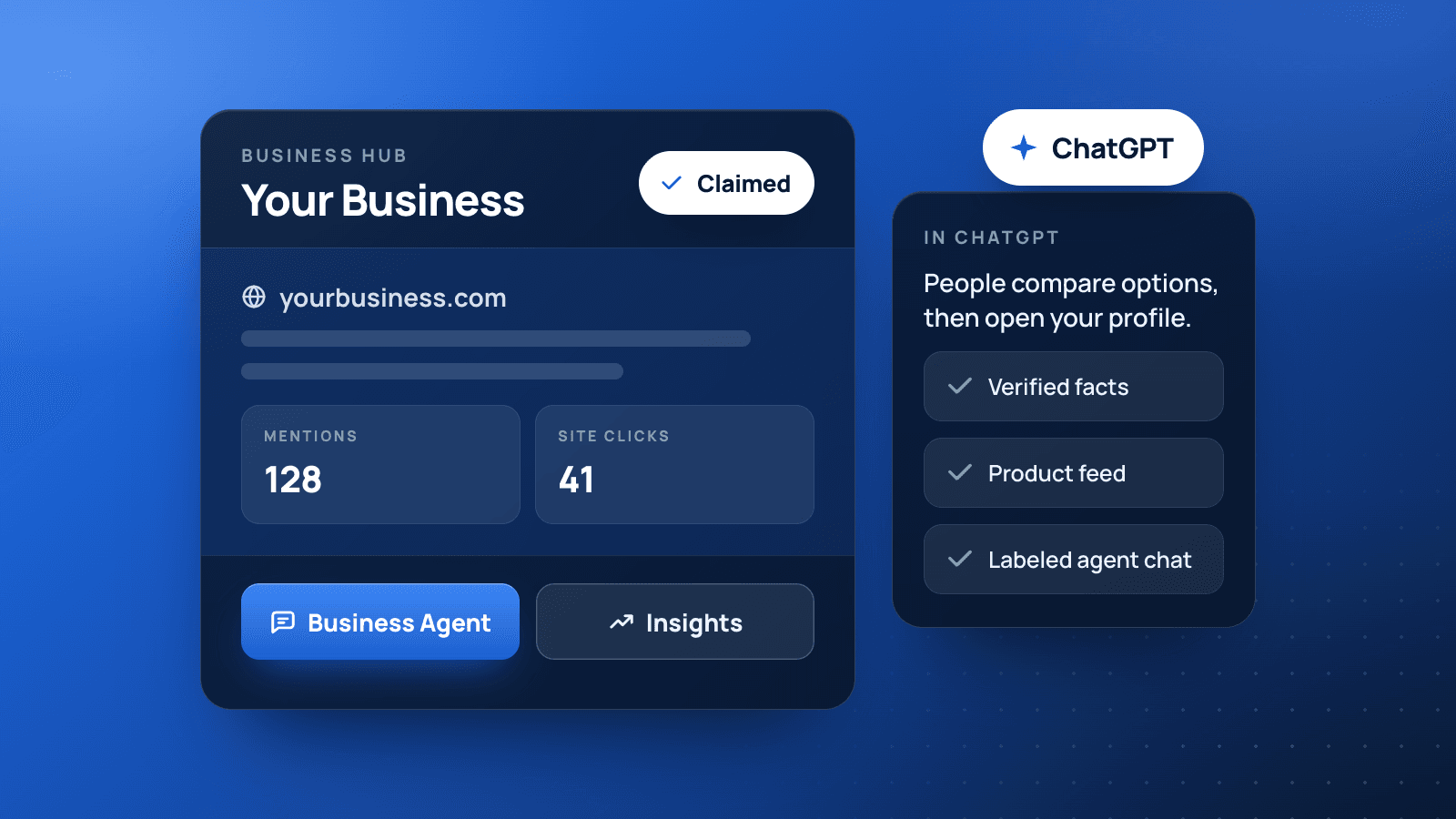
On November 10, 2026, OpenAI launched Businesses in ChatGPT in beta. Businesses can claim a profile in Business Hub, keep details current, see how often ChatGPT mentions them, and (for eligible U.S. ecommerce and online service companies) publish a Business Agent customers can chat with.
OpenAI says ChatGPT reaches about 1.2 billion people each week. Claiming does not buy a guaranteed recommendation. It gives you a place to correct facts, measure mentions, and (when eligible) answer follow-up questions from people already comparing options. Full announcement: Introducing Businesses in ChatGPT.
If you already treat Google Business Profile as table stakes, think of this as the ChatGPT-side twin: claim it, verify it, keep it honest, then let a clear website do the rest of the work for answer visibility.
What Businesses in ChatGPT Includes
- Claim and manage a business profile in Business Hub once you verify you own or represent the company
- Update key details (website, description, category, logo, policies) and, for retailers, connect product feeds with pricing and availability
- Aggregated insights for mentions, website clicks, and discovery topics over the past 28 days
- Business Agents for eligible U.S. ecommerce and online service businesses, so customers can start a labeled chat about products and policies
- Optional sponsorship / ChatGPT Ads that can send people to a Business Agent, clearly labeled and separate from ChatGPT’s own answers
OpenAI is clear on the hard limit: claiming does not guarantee higher placement or more sales. ChatGPT still makes independent recommendations. Your job is to make the facts it can use accurate.
Who Can Claim (and Who Gets a Business Agent)
According to OpenAI’s help docs, you can claim a business if you own it or are authorized to represent it. You do not need an Ads account or a ChatGPT Enterprise agreement. Eligibility still depends on location, business type, and OpenAI’s verification checks.
- Profile claim: Eligible businesses where ChatGPT is available, typically with a website. Existing OpenAI Enterprise customers and advertisers can work with their OpenAI representative. Shopify merchants can connect from Business Hub or the Shopify admin.
- Local stores and restaurants: OpenAI currently says they can claim only an existing U.S. listing (they cannot always add a brand-new local profile from scratch).
- Business Agents: Available now to eligible ecommerce and online service businesses in the United States with a website, subject to OpenAI’s Business Agents Policy. Many businesses can manage a profile without being eligible for an agent.
Setup guide from OpenAI: Setting up your business on ChatGPT. Product overview: Businesses in ChatGPT.
How to Claim Your Business in Business Hub
- Sign in to ChatGPT and open Business Hub from the sidebar.
- Search for your business by name and select the listing that matches.
- Confirm the ChatGPT account that will manage the profile.
- Verify with one of the methods OpenAI offers: business phone (SMS or call), business email, website domain (DNS TXT record), or Shopify.
- Wait for OpenAI’s claim review email (approve, request more info, or deny).
- Complete identity verification with Persona. Claiming alone is not enough to publish changes, view insights, or create an agent. The blue verified check appears after Persona approval.
If you cannot find your business and you run an eligible online company, OpenAI may let you add it. If the listing is locked, use Contact support. If someone else already claimed it, use Dispute ownership and verify authorization through Persona.
Admins can later invite teammates or an agency in Business Hub. Use each person’s own ChatGPT account. Do not forward a personal claim invite as a workaround.
What to Update After You Are Verified
Once claim and Persona verification are approved, open the profile and keep the same story you publish everywhere else:
- Website URL (HTTPS, your real domain)
- Business description and product or service category
- Logo and cover photo
- Delivery and return policies (especially if you sell online)
- Product feed (CSV or Shopify) with current prices and availability, if you sell products
OpenAI reviews and publishes changes. Updates can take time to show in a listing or in generated answers, and ChatGPT may still draw on other sources. A saved edit is not an instant rewrite of every reply.
Match this profile to your site and your Google Business Profile. Conflicting names, phones, hours, or service areas are exactly how answer engines hedge or pick the wrong business. For the bigger picture of how customers ask AI tools for a local business, see What Is Artificial Intelligence (AI)?.
Insights: Mentions, Clicks, and Discovery Topics
Business Hub Insights cover roughly the last 28 days, in aggregate only. OpenAI does not share individual ChatGPT conversations or Business Agent chats with businesses.
- Mentions (online businesses): Count when ChatGPT references your website. Saying the brand name alone does not count.
- Mentions (local businesses): Count when ChatGPT shows a result for that location, even if the person never opens the listing or visits the site.
- Website clicks: How often people click through to your site from ChatGPT.
- Discovery topics: Common themes in answers that cited your business. Themes, not individual prompts, and not a direct intent report.
A blank metric does not always mean zero. OpenAI says counts can be incomplete when activity is under a privacy threshold, still collecting, or temporarily unavailable.
Business Agents: What They Are (and Are Not)
After you claim and finish Persona verification, eligible U.S. ecommerce and online service businesses can build, preview, and publish a Business Agent.
How customers see it:
- When ChatGPT names your business, people can open your ChatGPT profile.
- If a published agent exists, they can start a separate, clearly labeled conversation with the business about offerings and follow-ups.
- That chat is distinct from the person’s original ChatGPT thread and from ChatGPT’s independent answers.
What the agent can do today:
- Explain products and policies using information and instructions you control
- Help someone compare options and decide whether to visit your site next
- Link out so the customer completes purchase, booking, or order lookup on your website
What it cannot do today: complete purchases, make bookings, or look up a customer’s order inside the agent chat. Publishing an agent is optional. Claiming, advertising, and publishing an agent are three separate decisions.
Test before you publish. Ask the preview the questions customers already ask (“Can I return a sale item?”, “Do you ship to Louisiana?”, “What’s the difference between these two plans?”). Fix wrong answers in your feed, policies, or agent instructions, then publish.
What This Means for Small Business Owners
Treat Businesses in ChatGPT like any other owned listing:
- Claim and verify as soon as you are eligible, so a stranger cannot lock you out first.
- Publish the same NAP, services, and proof you use on your website and Google Business Profile.
- Watch Insights for which topics ChatGPT already associates with you, then strengthen those pages on your site.
- Publish an agent only if you are eligible and ready to keep product and policy answers accurate.
- Do not expect claiming alone to replace SEO or a clear site. OpenAI says ChatGPT still recommends independently. Pages that answer real questions still win mentions.
BaseLynk’s answer visibility work is built for this moment: your name in the reply across Google, ChatGPT, and other answer tools, backed by pages that can take the call or the click.
Quick FAQ
Do I need to run ChatGPT Ads to claim my business?
No. Claiming, publishing an agent, and advertising are separate.
Will claiming make ChatGPT recommend us more?
No guarantee. Claiming lets you manage information you provide. It does not control independent recommendations.
Do I need Shopify for a Business Agent?
No. Eligible businesses can set up an agent without Shopify. Shopify can streamline verification and product feeds.
Can teammates or an agency help?
Yes. The claiming admin can invite people in Business Hub. Each person should use their own ChatGPT account.
Where are the official details?
OpenAI’s announcement, the Businesses in ChatGPT product page, and the setup help article.
Next Step
If you want a second set of eyes on whether ChatGPT already names your business, what your site should publish before you claim, or how this fits with Google Business Profile and local SEO, contact BaseLynk.
Disclaimer: Businesses in ChatGPT, Business Hub, and Business Agents are OpenAI products in beta as of November 10, 2026. Eligibility, features, insights thresholds, and policies are controlled by OpenAI and can change without notice. Always confirm current terms in Business Hub and on OpenAI’s site before you claim, verify, advertise, or publish an agent. ChatGPT and OpenAI are trademarks of OpenAI. BaseLynk is not affiliated with, endorsed by, or a reseller of OpenAI.